
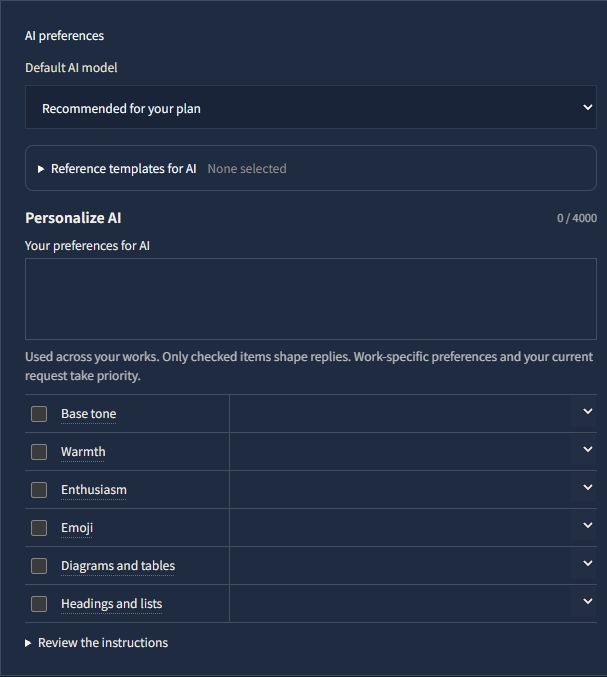
On the web, it is now easier to set writing preferences for each project and tell AI what you prefer across all your works.
Choose preferences for each kind of writing
In the writing workspace, Project settings lets you enter separate preferences for manuscripts, reference materials and AI conversations. You can specify narrative person, viewpoint and prose style separately from how reference materials are organized or how AI responds during a conversation.
If you are unsure what to enter, use the categorized helper items. Choose a suggestion or enter your own words. Hover over an item label to see a short explanation.
All helper items start disabled. Check only the items you want to use. Unchecked answers remain as drafts and are left out of the instructions sent to AI. You can also write your preferences directly in the free-text field.
Keep your usual AI preferences together
Open Preferences from the account menu to find Personalize AI. It brings the previous AI personality and user custom prompt settings together, while retaining your saved preferences.
Write directly in Your preferences for AI, or enable individual controls for base tone, warmth, enthusiasm, emoji, diagrams and tables, and headings and lists. These preferences apply across your works. Project-specific preferences and your current request take priority.
Clearer work updates and recovery guidance
AI work updates have been revised to explain what is being worked on or checked. Instructions for requests to create outlines, character profiles and similar writing materials have also been revised: when no destination is specified, AI is guided to save them as reference materials. You can still ask for an example in the conversation only.
If the AI connection cannot recover after retries, the reply explains that work has stopped and offers ways to check the result or resume.